Data Import
Data Import Purpose
Section titled “Data Import Purpose”Anybuild has a data import function which is extremely valuable
Data Import is ideal for importing Master Data and Opening Balances when implementing a new system or for data such as Bank Statements for Reconciliations.
Anybuild has another more advanced method of accessing external data - Data Connector (see below) this is suitable for more automated more permanent requirements.
Data Import works for ANY Entity defined in Anybuild.
It may make sense to create an Entity just for Data Import purposes i.e. an Entity that has the same fields as the External Data Source. It is then easy to manipulate and connect to such Data within Anybuild using Views, Functions, Linked Transactions and Workflows,
Data Import Definition
Section titled “Data Import Definition”Home >> Data Manipulation Layer >> Import Data >> New Import
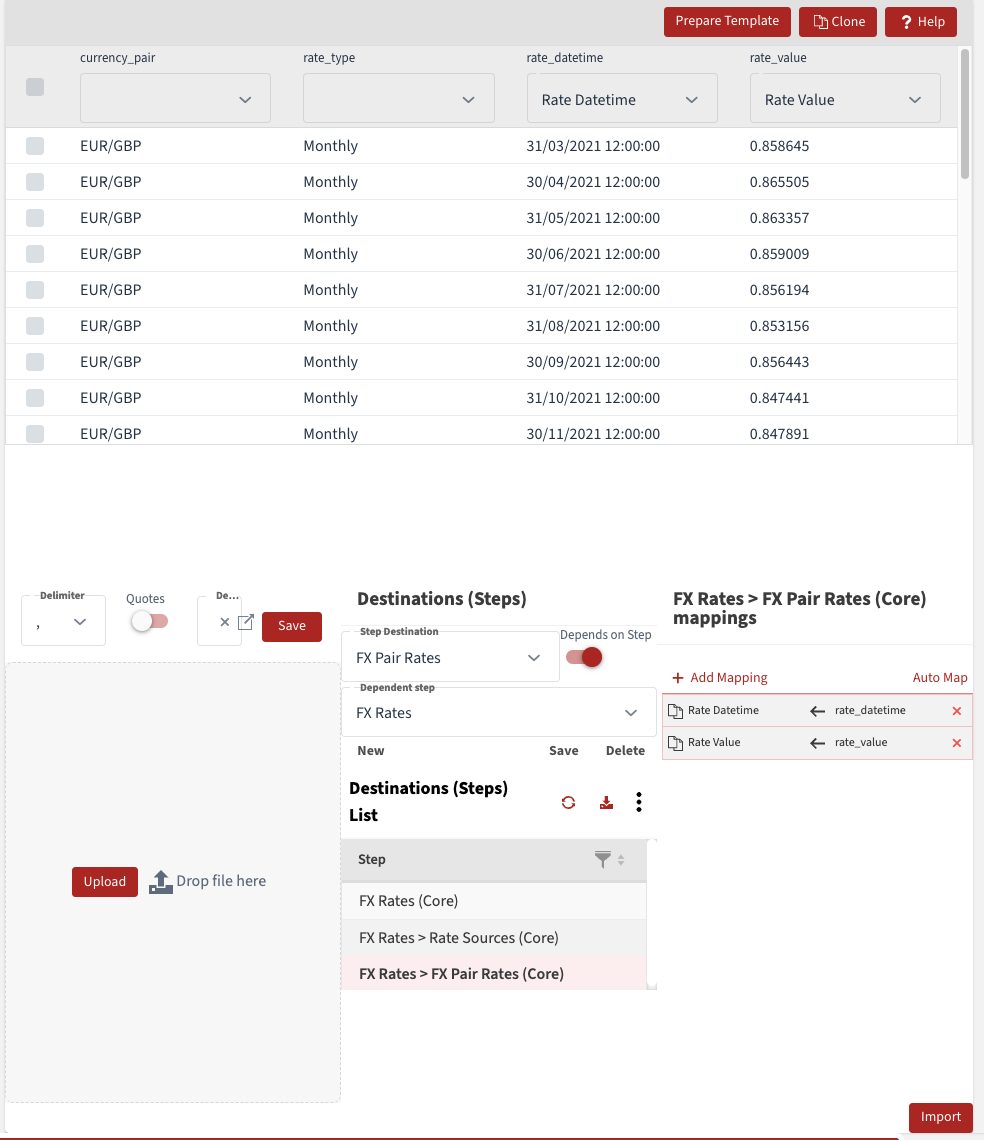
Below is an example screenshot for the definition of FX Rates import
The Steps correspond to the FR Rates Entity which has header for the Rate Pair e.g. EUR/GBP and Rate Type e.g. Monthly.
The Rate values are mapped to the sub-component FX Pair Rates.
In this example this spreadsheet column headings are the same as the filed names - this makes it very easy to map to the correct columns - Auto Map should work for this.
Templates can also be prepared from definitions.
Click on Import Button to initiate the import.
NB Main Destination should be Header Entity e.g. FX Rate
Then use Steps to assign Sub Component Destinations