Entities
Entity Overview
Section titled “Entity Overview”The most important Anybuild component is an Entity.
Entities are real or abstract things which can be thought about as having an independent existence.
e.g. Party, Customer, Invoice, Opportunity, Item, Place etc
Before designing an Application you should think about the most important Entities required e.g. if you were planning a Real Estate App - Key entities would probably be something like: Property, Owner, Tenant, Buyer, Prospect, Rental, Sale etc
Then think about Entity Relations e.g. a Rental is dependent upon 3 Entities Property, Owner, Tenant so these 3 Entities must be created before the Rental Entity. (see how to create Relations in Fields below)
If you have a Sub Relation type of Entity where the sub-entity cannot exist without the parent entity then this should be created as a Component (see Components below) e.g. Invoice lines should be created as a multiple component of Invoice Entity this is a 1 to many relation. The component can have its own Relations such as Line Items (see Sales Invoice Entity in Core to illustrate this).
Anybuild ships with many ready-made ERP & CRM Entities in the Core Application. These can be used by New Applications or they can be Cloned and amended.
Entity Designer
Section titled “Entity Designer”Home >> Data Definition Layer >> Entities >> New Entity
To Amend Existing Entity - Double click on Entity from List
Entities are created in Entity Designer
Entities are composed of Fields or Components
Fields
Section titled “Fields”Click on  button (top right) to add a Field to your Entity
Think of Fields as Entity Attributes or Columns in a Table
Field Kind: Value, Reference, Virtual Calculation, Materialized Calculation.
Relations
Section titled “Relations”Reference creates a Relation to the Entity selected in Field Type below.
Entities often have Multiple Relations e.g. see Sales Invoice which has Relations to: Invoice Type, Customer, Currency, Business Unit, Sales Order.
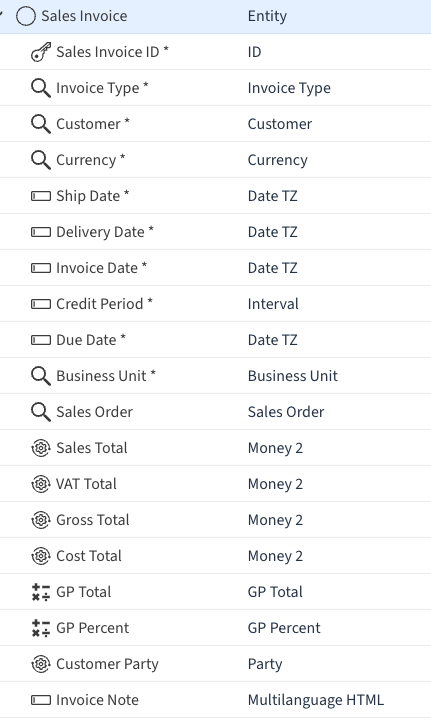
References are automatically created for ALL Entities.
Composite Adhoc References Relations
Section titled “Composite Adhoc References Relations”These can also be created easily from views - see Entity advanced topics below,
Reference Filtering / Mapping
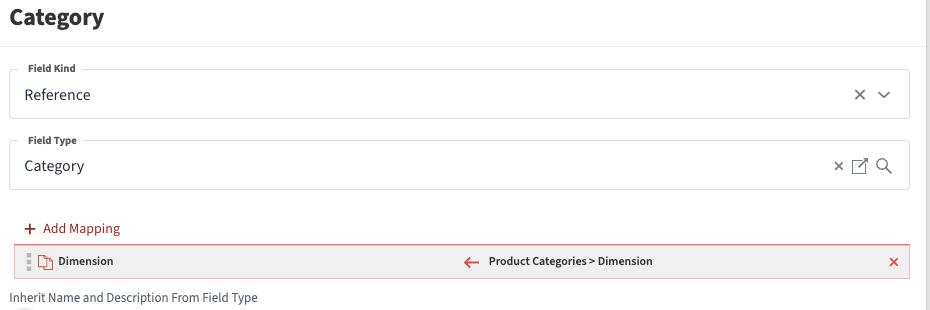
Section titled “Reference Filtering / Mapping”A powerful feature is the ability to filter References - to make data-entry much easier eg on the example below for a Sales Quote there is a mapping from the Sales Party in Quotes to the Sales Party in Opportunities.
So when the user links the Quote to the Opportunity they will only see Opportunities to the same Sales Party (Prospect or Customer)
This may filter 1000’s of Opportunities down to a few and make data entry much easier faster and more accurate.
Values
Section titled “Values”Values are for Attributes that are not a Relation to other Entities such as Text, Numbers, Quantities and Dates.
e.g. in Sales Invoice: ID, Credit Period, Ship/Delivery/Invoice Dates.
Selecting Types Entities etc
Section titled “Selecting Types Entities etc”To select an Entity or Type you can click on the  icon to bring up a sortable and searchable list.
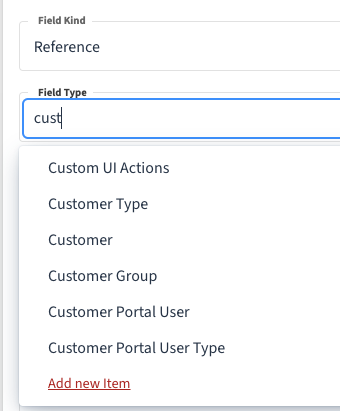
A faster more convenient method is In-Field Searching just start typing any part of the target name and a mini list will appear that you can search for e.g. see screenshot below - type cust then select Customer from the list
Field Type
Section titled “Field Type”Reference - Entity
Section titled “Reference - Entity”For Field Kind Reference Enter the Name of the Entity you want to create a Relation with e.g. Customer.
Value - Data Type
Section titled “Value - Data Type”For Field Kind Value Enter a Data Type - These can be a Base Data Type or a Custom Data Type.
Base Data Type
Section titled “Base Data Type”Base Data Types are the Data Types that come with PostgreSQL such as: text, integer, bigint, boolean etc
see https://www.postgresql.org/docs/current/datatype.html for a list and explanation of available Base Types.
Custom Data Type
Section titled “Custom Data Type”Home >> Data Definition Layer >> Field Types >> New Field Type
To Amend Existing Type - Double click on Type from List
A powerful Anybuild feature is to create Custom Field Types where you can define more refined constraints than the base type has.
e.g. the Base Type smallint must be a whole number between -32768 to +32767 you could define an even smaller whole number by creating a custom type based on smallint that has a constraint defining a smaller number range.
See detailed help for instructions on this, has examples Credit Card checks that use Regular Expressions.
Composite Field Type
Section titled “Composite Field Type”See >> Entities >>Advanced Topics >> Entity Composition below
For an example of a composite Filed Type Sales Party which is the combination of Prospect and Customer entities in a Union View - which is then used as the basis of a custom field type