Introduction
Onedb Online Ltd and Onedb Service Delivery Ltd are the companies that operate and own the Anybuild Platform.
Onedb originally focused upon developing a next generation adaptable integrated ERP and CRM - all in a single Database - hence the name.
Building a combined ERP and CRM is a huge task, in order to do this quickly and efficiently we developed a suite of amazing AI, No-Code and Low-Code tools.
These powerful tools work at a much higher abstraction level than Traditional Coding, so are very fast to develop with. They also create higher quality software with much less bugs. Over 120,000 hours of R&D has been invested into the their development.
We later started to sell these tools independently and to better reflect their purpose we created the brand Anybuild.
Anybuild covers our AI, No-Code, Low-Code Rapid Application Development Tools.
Onedb Smartsuite covers our ERP CRM CMS Adaptable Business Applications.
Anybuild Creator
Section titled “Anybuild Creator”Anybuild Creator fuses the best of Ai and No-Code into any incredible Application Builder that enables anyone to create sophisticated powerful Business. Applications. Anybuild does not require coding ability. It is also ideal for Software Engineers enabling them to focus upon rapidly creating a valuable solution instead of lines of code.
AI - Text to App
Section titled “AI - Text to App”Leveraging AI LLMs Anybuild can create an Application from a text Prompt describing the desired Application.
Even a short prompt will create an Application.
Usually it is better to use a longer more prescriptive specification, this will be more deterministic and more likely to create software that is unique and can provide competitive edge.
Do not worry too much about getting it right first time though because it is easy to change, to iterate with Anybuild either with refined text or using the Interactive ER Diagram (see below) or with Visual Tools (see below).
Screenshot Example Text Prompt Below
Section titled “Screenshot Example Text Prompt Below”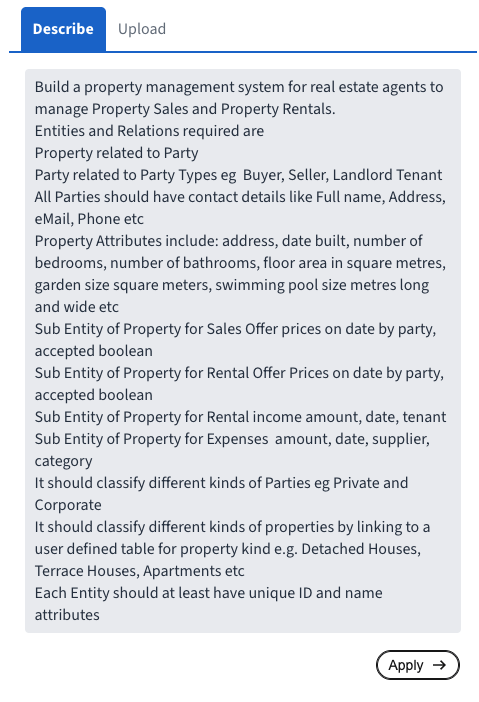
Interactive ER Diagram
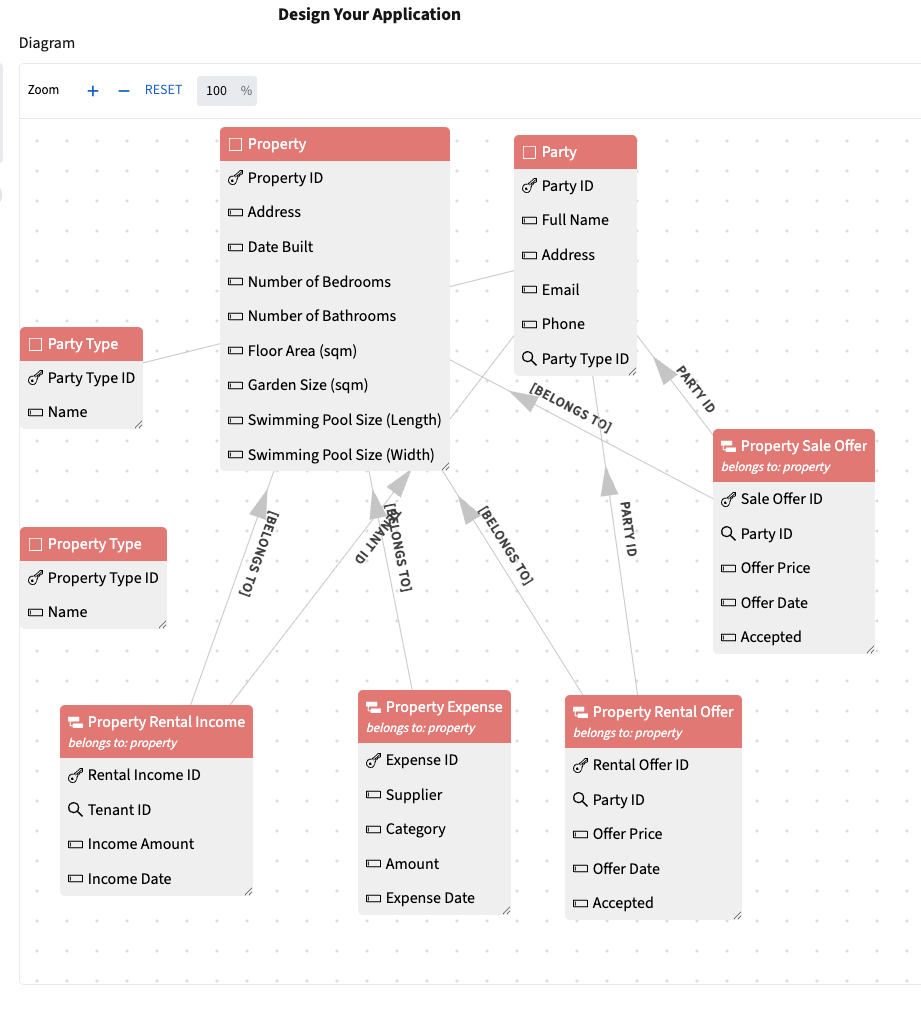
Section titled “Interactive ER Diagram”After starting with a Text prompt Anybuild AI creates an ER Diagram (Entity Relationship Diagram) this should reflect the intent of the text description.
From the ER Diagram It is easy to make changes such as: adding or amending: Entities, Relations and Attributes.
Typically it is easier to exactly define what you want with the ER Diagram than with a Text description, also the ER Diagram is completely deterministic ie the Entities and Relations in the Diagram will definitely be incorporated into the Application.
No-Code
Section titled “No-Code”Anybuild is a No-code cloud based platform for designing and building - All kinds of Business Applications - using Graphical Point & Click designers i.e. completely without code.
Anybuild is 25X more productive than traditional coding because designers work at a much higher abstraction level by defining Business Entities and their Relations instead of defining thousands of low level components such as: statements, expressions, variables ,objects, tables, widgets, screens, servers, databases, interfaces, security etc
Code Option
Section titled “Code Option”Sometime it does makes sense to use code particularly with SQL which is a very productive high-level Declarative language.
So Anybuild offers the best of both worlds allowing components to be defined either with Point & Click graphical designers or with Code.
All Components, even those defined by code, are fully reusable so they can then be used as building block later in Point & Click designers.
SQL is particularly powerful for Data queries, Analysis and Manipulation so is available for defining Views and Functions.
HTML, CSS, Javascript are available for defining widgets, web pages and user interfaces. Many Web Designers are skilled with these industry standard languages so appreciate the option to use code for ultimate flexibility and control. Again this is purely optional since Anybuild ships with hundreds of ready-made Widgets and Layouts which can be defined and arranged using Point & Click designers.